Saturday, February 19, 2011
More HeyTell Server Upgrades
Friday, February 11, 2011
Happy 1st Birthday, HeyTell!
HeyTell just hit its first birthday, and what an incredible first year it's been! On February 10, 2010, fresh off the adrenalin of the Saints' Super Bowl victory in New Orleans, HeyTell was publicly launched with very little fanfare. 33 intrepid users downloaded HeyTell its first day in the App Store.
One year later, with HeyTell exceeding 3.5 million downloads, HeyTell users are proving that there's a place in their hearts (and their work days, and their nights out) for quick, personal push-to-talk style voice messaging.
And for this, we thank you, each and every amazing HeyTell user — you are truly what has propelled HeyTell's growth and acceptance as a vital communication tool for daily use. Your passionate sharing of the app with friends, family, and co-workers makes inroads each and every day in pushing forward the idea of quick voice messaging as a highly effective and personal mode of communication...not to mention minimizing the number of sore fingers and misunderstood text messages out there!
We're also really happy to report that it's possible to bootstrap a product and have millions of people use it in just a year. It's surely not easy; we absolutely owe a debt of gratitude to our family, friends, and advisors, ubiquitous Internet and mobile broadband, cloud-based hosting like Amazon Web Services, and distribution channels like the App Store and Android Market. We believe this entire endeavor would have been nearly impossible to pull off just a few years ago.
So what have we been up to lately? We recently released a brand new backend architecture that should scale to handle our anticipated growth through and beyond the next year and are hard at work on improved clients for iOS and Android. We're also looking towards additional platform support and expanded localization support as part of our efforts to grow internationally. In addition, we hope to have some fun announcements for you in the coming weeks!
And, because no 1st birthday should pass without a 'baby book' of sorts, we give you HeyTell's 12 month usage statistics:

HeyTell reached over 10,000 people by the end of February 2010. HeyTell hit the 1 million user mark in October, 2 million by early December, and 3 million in mid-January. Our biggest download day of 2010 was December 25.
December 25 was also a big day for the iPod 4G - we saw 5 times the number of new iPod registrations on December 25 than any other day of the month!

Registrations don't mean much, though, if people don't keep coming back. Around 450,000 people check in with HeyTell each day now. Each week, 1 million check in. Every month, we see around 2 million users sending, receiving, or checking their HeyTells.

So why do HeyTell users keep coming back? We believe it's because their friends and family keep coming back. Over 1.7 million messages are sent a day in 2011, and, over HeyTell's year of service, over 215 million messages have been sent:
If it were possible to play all audio transmitted via HeyTell end-to-end, it would take 44 years to play it all back!
So who's using what? Our figures show that roughly 25% of our users run Android operating systems, and 75% run iOS.
The Android audience is very diverse, there are 1114 different combinations of Android device and OS, compared to 35 iOS variations. The most popular Android phone among HeyTell users appears to be the HTC Evo; however, the most popular since December 2010 is the Samsung Galaxy S.

So, that's the HeyTell year in review—thanks to everyone who participated in HeyTell's Year One—we couldn't have done it without you! We hope you stick around and we look forward to another fantastic year ahead!
Monday, November 29, 2010
iOS and Android: The Odd Development Couple
Tuesday, November 9, 2010
Viral Marketing for Nerds and Data Junkies
Thursday, August 26, 2010
Steve & Jen Speaking at 360|iDev Austin in November
We enjoyed it so much, that when we heard "November in Austin," we knew we'd be there for sure. It seemed like a good idea to give back and share some of the things we've learned from the release of HeyTell Voice Messenger, so we both submitted talks — and both were accepted!
Steve will be presenting Viral Marketing by the Numbers where he'll bring a developer's perspective to marketing the freemium iPhone app HeyTell Voice Messenger and how it gained 100,000 users using a purely viral marketing model without paid ads or employing conventional PR.
He'll talk about the features and performance of viral vectors by the numbers, predicted vs. actual growth, and will draw some parallels between viral propagation of an app and nuclear reactions. The audience will hopefully take away additional ideas and strategies for successfully incorporating viral elements into their applications.
Jen's going to dig into The Reluctant SysAdmin: Managing the Server-side of a Client/Server iPhone App, where she'll talk about all the fun and not-so-fun things about managing the server-side of a client-server app with an emphasis on security, reliability, and survival (and sleep!) when you're small & indie.
She'll hit on some of the fantastic things about maintaining a server component (metrics, Push Notifications, App Store receipt handling, did we mention metrics?) as well as the not-quite-as-fantastic (24x7 system monitoring, data security, and attacker-thwarting, rolling upgrades for services that can't go down, the occasional sleepless night) and will then focus on processes, products and technologies that make this all easier for a small team to implement, including continuous integration strategies, use & abuse of Amazon Web Services (EC2), and open source solutions for security & monitoring.
As you can see, we're really excited about 360|iDev in Austin - if you're coming, can't wait to see you. If you're considering, hurry up and book it! If you're not, reconsider and book it anyway!
Tuesday, August 24, 2010
Gauging User Sentiment with Word Clouds
So I popped over to iTunes connect, expanded user comments and saved as HTML. A little command line fu, like such:
grep "review-text" DownloadedComments.html |awk -F '\">|\<\/P' '{print $2}'Copy and paste the output to http://wordle.net, et voila, user sentiment made pretty:
Monday, July 26, 2010
Requirements Tracking For Total Slobs
The Process goes as follows: Product Managers generate Functional Requirements which go to the Engineers which turn these into Design Requirements which go to the Developers which develop The Product which goes to QA who uses the Design Requirements to create a Test Plan which then gets sent to Integration Teams which use the Documentation generated from the Design Requirements to make the Installation Guide which then results in the Customer getting ... well, something.
This is a little heavyweight for the standard indie dev shop, but there's a good practice hidden here, which is the generation of Requirements. Why would you want to make actual Requirements when DESIGN.TXT in your home directory will do just fine? There are several reasons:
- They encourage you to record design decisions, and act as high-level code documentation.
- They give you a way to generate test plans - each requirement should be a testable feature of the product.
- When doing a port to another platform, they let you know when you're done (when all the requirements are checked off)
- They let the test team know when they're done (when all the requirements are checked off)
Of course, no one is really going to go through much extra effort generating documentation when they could be making apps and making money. That's foolish. That's why I'm going to show you my bone-simple Requirements Generation Technique. Watch closely!
1. A requirement is defined in a source file (.c, .cpp, .m, .java etc) with a code comment. Here is an example:
// Requirement: When a Butterball is hit with a bullet, split it into two Niblets.
2. Generating a design document is done as follows:
% find . -name '*.[cm]' -print0 | xargs -0 grep Requirement: > design.txt
3. Doing a "Gap Analysis" (comparing two design docs) is done as follows:
% sdiff design1.txt design2.txt
With a little effort, you can pipe requirements to CSV files and upload to Google Docs so other team members can review, make test plans, etc.
Congratulations! You've just replaced thousands of dollars of expensive requirements-tracking tools and at least three middle managers! You've also taken a step to better documenting your code and your product so others can more easily play in your sandbox. You don't need an overweight version of The Process like our example bureaucratic organization, but it helps to have a little organization in whatever you do.
Monday, April 5, 2010
Top 10 Bolt-On Cocoa Touch Libraries
1. Reachability - Every iPhone developer should know about this. It's the Apple-approved way to check to see if network connectivity is available from your app. It helps to wrap this with your own code for generating helpful Alerts when the network bounces up and down.
2. SFHFKeychainUtils - The Keychain API may look scary, but it's useful too. How else will you store encrypted, backed-up key-value pairs that persist across uninstalls of your app? This wrapper API has just a handful of easy-to-understand methods.
3. Plug in an analytics API like the Medialets SDKs to capture information about your app at runtime. In just a few minutes you can be capturing app installs and start/stop events, a little more time gives you custom app events and lets you integrate ads into your app.
4. java-apns - Ashwin Phatak's Java library for push notification. Requires a bit of integration work (and a server component) but much better than rolling your own. (ok, so it's not a Cocoa Touch library per se - but it's essential if you're doing APNS in Java)
5. Combine your native code with HTML by using PhoneGap and iUI to make look-alike user interfaces in HTML, JavaScript, and CSS.
6. If you're a game developer you must have heard of OpenFeint, so there's no need to explain this popular social-media-enabling bolt-on library.
7. Appirater helps you get feedback on your app by requesting a review after a configurable amount of time or number of app runs. Just a few minutes to integrate.
8. The default HTTP client libraries sometimes don't cut it, especially when streaming or multi-threading. Try ASIHTTPRequest and get a wealth of features above and beyond what the standard NSURLRequest provides.
9. When building apps that parse XML from REST queries, you may want to try TouchXML which provides an easy-to-navigate DOM tree object from your XML documents. Don't like XML? Try Google's Protocol Buffers or Apache Thrift for more efficient and robust network protocol structures.
10. And when your project is ready to ship, give Hudson a try to automate your builds. The new Xcode 3.2 provides features that may help in archiving built products, but I think there's still value in doing a clean checkout and build from the repository (instructions for iPhone here)
We hope these give you some ideas on how to save precious mental CPU cycles on your next iPhone/iPod/iPad project!
Thursday, January 7, 2010
Reduce your micro-startup burn rate...and see the world, too!

At Voxilate, we've taken a novel approach to reducing capital expenditures while maximizing productivity and creativity: we're taking the show on the road and are putting our money where our mouths are--creating voice-activated applications for mobile devices while being mobile ourselves!
This is a bit easier to do as a micro-startup (also known as "Micro ISV"), given highly-available mobile broadband and ubiquitous wireless Internet connectivity, competitive hosting and "cloud" solutions, and the myriad online, hosted services at our beck and call these days.
Here's a quick rundown of tips we've found vital to our mobility so far (we will expand on these in later posts):
Mobile broadband: Don't leave home without it. We purchased a wireless broadband plan and wireless card that's plug-and-play with our mobile broadband-enabled CradlePoint MBR900 router. We also have a PepWave Surf personal wi-fi receiver that can harness available wi-fi and make it available to more than one team member or computer.
Network redundancy: Make sure you're bound to more than one network and/or cell provider. You want to always be able to call out, check email, and connect to remote systems with at least one of your team's phones or netbooks using wireless broadband cards or cell-phone tethering. We often switch between AT&T and Verizon services. Would be better to switch between three or four - but we're talking about belt-tightening, here!
Hardware: In addition to your mobile broadband card and portable routers, a good mix of laptops, external hard drives, and small form-factor systems like the Mac Mini will serve you well. You'll also want cigarette-lighter power adapters to power and charge your stuff - and, if there are more than one of you not driving while on the road, use the router in the car with the broadband card. Also remember to bring power strips, outlet expanders, Ethernet cables, thumb drives, extra chargers, connectors, and so on.
Internal Systems: You should have a source control system, build system, and bug system for development. What you choose to administer locally or remotely is up to you, but do make sure that everyone's got a copy of the source repository checked out and if you're self-hosting build & source control, ensure that you can swap build and source control systems from one laptop or mini-server to another in case of catastrophe. If you're going to be someplace for a day or two, make sure you check in your code. During this 'period of stability,' remember to also rsync (or some other replication method) to back up your critical systems to your hard drives as well as a secure off-site backup provider that you trust and uses encryption.
Hosting redundancy: Choose hosting providers you trust and who have good reputations - don't always go for the cheapest (although price doesn't always mean quality, either!). Look for hosting providers that provide data center geographic diversity. Augment with other providers - you want the ability to quickly bring your systems up in case of a hosting provider's catastrophic failure. Amazon's web services are excellent for this purpose--encrypt and backup your data to S3, build your backup systems with EC2 & EBS--and pay only when you need to bring them up or test (and you can bring them up in minutes, with simple shell scripts). Great for staging/development/pre-production servers, too.
System monitoring & Maintenance: You'll want to set up something to quickly alert you via email or SMS when remote systems go down - use a service like Pingdom and supplement with self-monitoring on your hosts. Sign up for system status and downtime alerts (if you're not added by default) for all of your providers. Follow their Twitter feeds and check your email. Do what you feel you need to do to keep peace of mind and security; script it, add it to crontab, and have it email you its results. For example, scan your web logs for unexpected traffic that doesn't 404. Monitor vulnerability alert RSS feeds for software you use (both locally and especially on your externally hosted systems). Use Snort and OSSEC. Use whatever tool(s) you love. I love elementary shell scripts. Lots of people love Nagios. Many adore splunk. Mix and match for great justice.
Delegation: Use services to do your bidding and spend your time doing what you do best. Take advantage of great services like Amazon's Mechanical Turk for quick, repetitive, or data entry type tasks and 99designs.com for graphic design expertise. Get a good accountant that can meet via phone or email. Use online fax and voice services to stay connected wherever you happen to be.
Mail: We use trusted family members and a mail receiving/scanning service, Earth Class Mail. You can view your mail online and have it scanned and/or snail mailed to you wherever you happen to be, singly or in batches. They even have an auto-deposit option for checks you receive. Also try to configure anything you can to send you bills and notices online--scanning costs can add up.
Digital and Physical Security: This is a biggie! When you're carrying your tech like a turtle on your back and depending on the wireless of others, an awareness of both physical and network security are vital. Don't connect to wireless networks you don't trust. Don't check your bank balance using hotel wireless, for example, and always check certificates (although that isn't any guarantee these days, unfortunately). Be careful what you download. Bring your own routers to ensure that you can connect to your local resources without going over the public Internet.
As far as the real world goes: Assume everything you have will be stolen and plan for the occasion. Make copies of all important documents and store with someone you trust. Categorize the importance of what you're lugging, then lock up the most valuable things and keep them on your person when you leave your vehicle for the night. Get into a routine, and make everyone crosscheck each other so you don't leave anything behind.
Short-term locations: Go beautiful, go off-season. Use sites like HomeAway.com. Check out executive long-term stay spots as well - if you plan ahead, you can often get a really nice condo in a great location for much less than you'd pay for a standard hotel room.
Make sure they've got broadband, and come prepared with all the things described above. Plan your stays around your work schedule - stay awhile if you're in deep development. You don't want to be on the road (well, with the tips above, you can be if you want to be!) when you've got a lot of coding or testing to do!
Trust, but verify: Verify your setup before you embark long-term. Use your network setup where you're currently at, then take it with you on the road. Try staying somewhere local for a week or more, near friends/family/business acquaintances so that you can easily offload equipment you find you don't really need.
These are just a few of the things we've done to reduce our micro-startup 'burn' while enjoying a spectacular view.
EN576M6GTHWF
Friday, November 20, 2009
Turking the Healthcare Bill
We'd hate to pass up the opportunity to perform a public service, so we took a few minutes to use our technology to ask Internet denizens (via Amazon's Mechanical Turk) to collectively read the bill in a lot less time than the 36 hours it would take to read it on the Senate floor.
We know that the eyes of the average citizen tend to glaze over looking at the bill, so we opted out of asking turkers for a deep analysis of each page -- they wouldn't have context of neighboring pages, for instance. We instead asked for a visceral response; we asked each turker to type in their most favorite and least favorite words (from their point of view, of course) that they could find in their particular page of legislation.
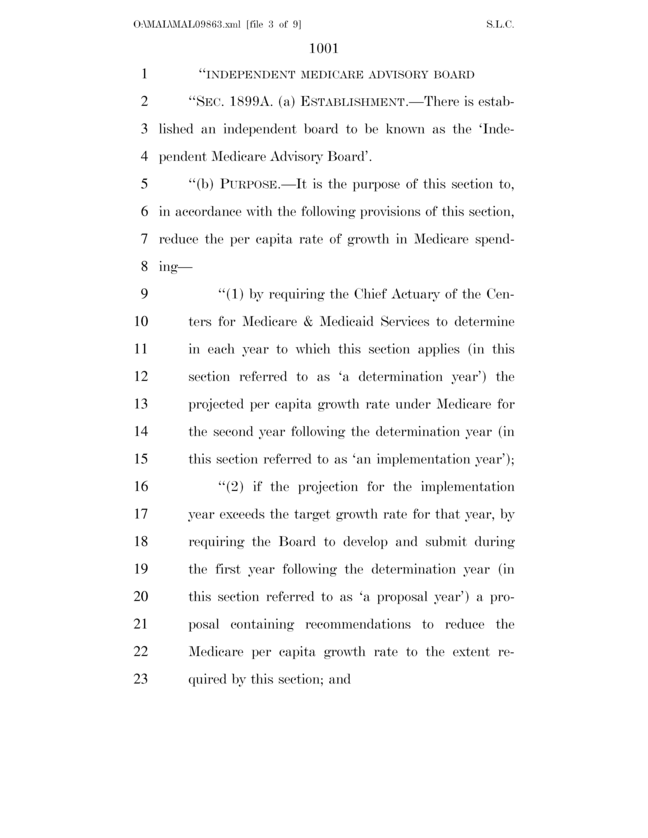
First we converted each page of the extremely-long PDF into individual bitmaps -- each one looking something like this (though larger):
Then we used our command-line client (discussed previously) to submit each page individually to Mechanical Turk.
The best (most preferred) words can be visualized in the following word cloud:
The worst (least preferred) words are here:
So what does this all mean? Well, if you read the images literally, citizens want quality affordable health benefits, information, and respect. They are fearful of abuse and fiscal limitations . They also loathe the bill's document structure ("subparagraphs" and "subsections") and legal mumbo-jumbo ("striking" and "amended").
The final costs were as follows:
Mechanical Turk fees: $20The $20 fee results from each worker's payout of 1 cent for their analysis of a single page. Certainly you'd have to pay a well-heeled K-Street analysis firm a bit more for a similar result. ;)
Time until entire bill was read: 8 hours